SEHR Program Registration: How to Apply Full Guide 2026
The CM Punjab SEHR Program 2026 registration process involves three distinct programs: Digital Skills, Beautician Training, and Hospitality Training, each with its own application portal, document checklist, and approval steps. This guide covers the complete CM Punjab SEHR Program registration process exactly as confirmed by the Women Development Department (WDD), Punjab, including which portal to use, what documents are required, and what happens immediately after you submit your application.
Before applying, it’s important to check the current registration status, since not all three skills are open at the same time. Below, you’ll find a step-by-step breakdown of the registration process, along with a visual preview of each screen so you know exactly what to expect, followed by the latest skill-wise status to confirm whether you can apply right now.
Current Registration Status (Check Before You Apply)
| Training Skills | Registration Status |
|---|---|
| Digital Skills | Temporarily paused; WDD is updating the certification process. Applications are not being accepted. |
| Beautician Training | Open, processed on a rolling, district-by-district basis |
| Hospitality Training | This skill is currently open, and you can apply now. |
This page is updated as soon as the digital skills reopen. If you see a third-party website claiming to accept digital skills applications right now, treat it with caution and verify directly with the Women’s Development Department first.
Which candidates are eligible for the SEHR program?
Eligibility requirements for the CM Punjab SEHR Program 2026 vary depending on which skill you’re applying for, as confirmed by the Women Development Department. Here’s a breakdown for each skill:
Digital Skills
- Who can apply: Rural women of Punjab only
- Age: Mainly under 30 (90% of seats reserved for this age group); 10% of seats open to women above 30
- Education: 16 years of education (bachelor’s level)
- Other requirements: Valid CNIC, Punjab domicile, and rural classification as per LG&CD/PBS records
Beautician Training
- Who can apply: Women across Punjab, both rural and urban
- Age: 18 to 45 years
- Education: Literate; no formal degree required
- Other requirements: Valid CNIC, Punjab domicile, priority given to widows and divorced women
Hospitality Training
- Who can apply: Women across Punjab, both rural and urban
- Age: 18 to 45 years
- Education: Matric (10th grade)
- Other requirements: Valid CNIC, Punjab domicile, priority given to widows and divorced women
If you’re unsure which skill you qualify for, it’s best to review the requirements for all three before applying. Meeting the education criteria for one skill doesn’t automatically mean you qualify for another.
What documents do you need before applying?
While the exact steps vary slightly depending on which skill you choose, the overall registration process follows the same general pattern across the program. For a complete breakdown, including document checklists and screenshots of every step, visit our detailed registration guide. Your original CNIC (or Form-B from NADRA if you do not yet have a CNIC)
- Proof of Punjab domicile
- Your educational certificate matches the requirements for your chosen skill
- A recent passport-size photograph (digital copy, JPG or PNG)
- An active mobile number registered under your own CNIC is required for OTP verification and cannot be a family member’s number
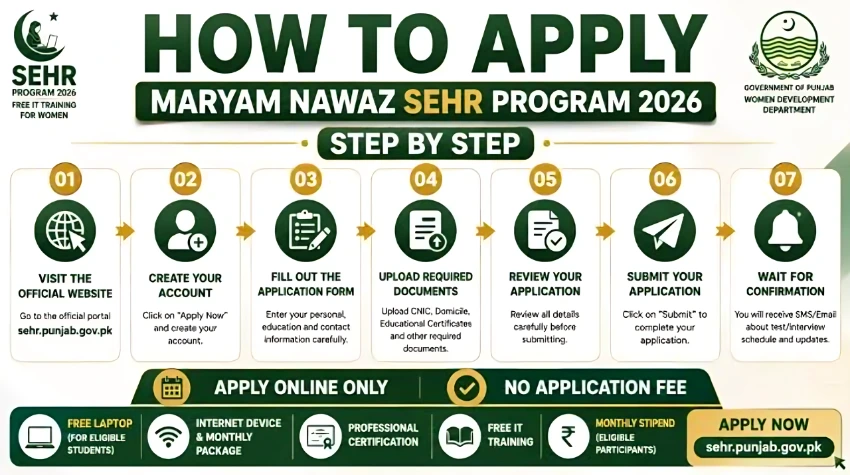
Step 1: Enter Your CNIC and Choose Your Skill
Start by visiting the correct registration page for your chosen skill: the Women Development Department’s SEHR page for beauticians and hospitality applicants. Enter your 13-digit CNIC number without dashes, then select your preferred training skill and district from the dropdown menus. You will also need to enter a short verification code (CAPTCHA) shown on the screen to confirm you are not a robot.
Step 2: Verify Your Mobile Number
After submitting your CNIC, the portal sends a 6-digit one-time password (OTP) by SMS to your registered mobile number. Enter this code within the time limit shown on screen, typically around 5 minutes. If you do not receive the code, use the Resend Code option rather than refreshing the page, which can reset your progress.
Step 3: Upload Your Documents
Once your number is verified, you will be asked to upload four documents: your CNIC (front and back), proof of Punjab domicile, your educational certificate, and a recent passport-size photograph. Each file must be under the size limit shown next to it, so it is worth compressing large photo files before uploading to avoid an upload error.
Step 4: Review and Submit
The final screen displays a summary of everything you have entered: your name, chosen training skill, district, and document upload status. Review every field carefully, since most portals do not allow edits after submission. Tick the confirmation checkbox and submit your application.
After You Apply: Verification & Interview Process
- Your application enters a review queue, where it is checked against the eligibility criteria for your selected skill
- If you are shortlisted, you will receive an SMS notification with details of an interview or document verification appointment at your district’s designated training center
- Bring the original copies of all documents you uploaded online to this in-person appointment; photocopies are not accepted
- After verification, successful applicants are enrolled into the next available batch for their chosen skill and district
- If you are not shortlisted in the current batch, your application may be considered for a future batch, depending on available seats
Common Registration Mistakes to Avoid
- Using someone else’s mobile number: the OTP system is tied to your CNIC, so using a number not registered to you can cause verification to fail.
- Uploading blurry document photos: applications with unreadable CNIC or domicile scans are commonly rejected during manual review.
- Applying for the wrong skill: Double-check the eligibility requirements before selecting Digital Skills, Beautician, or Hospitality, since switching skills after submission is not possible.
- Leaving the form idle: Most registration portals time out after a period of inactivity, requiring you to start over from Step 1.
Explore Other Punjab Welfare Programs
You may also find these related Punjab government initiatives useful:
- CM Punjab SEHR Program 2026: Eligibility & Apply Online
- Maryam Ki Dastak App: 70+ Govt Services at Your Doorstep
- Aghosh Program: Eligibility & Cash Transfer Details
- Khud Mukhtar Khatoon: Financing for Women Entrepreneurs
Frequently Asked Questions
Can I edit my application after submitting it?
No. Most government registration portals, including this one, do not allow edits after final submission. Review every field carefully on the confirmation screen before submitting.
What if I don’t have internet access to register online?
The Women’s Development Department states that women without internet access can seek assistance from local NGOs, community organizations, women’s groups, or district-level government offices to complete their registration.
How long does it take to hear back after applying?
There is no fixed timeline published by the department. Shortlisted applicants are typically notified by SMS once their district’s batch is being scheduled, which can take anywhere from a few weeks to a couple of months, depending on demand in your district.
Can I apply for more than one training skill?
The official guidance does not explicitly confirm or rule this out. To avoid jeopardizing either application, it is safer to apply for the single skill you are most eligible for and most interested in completing.